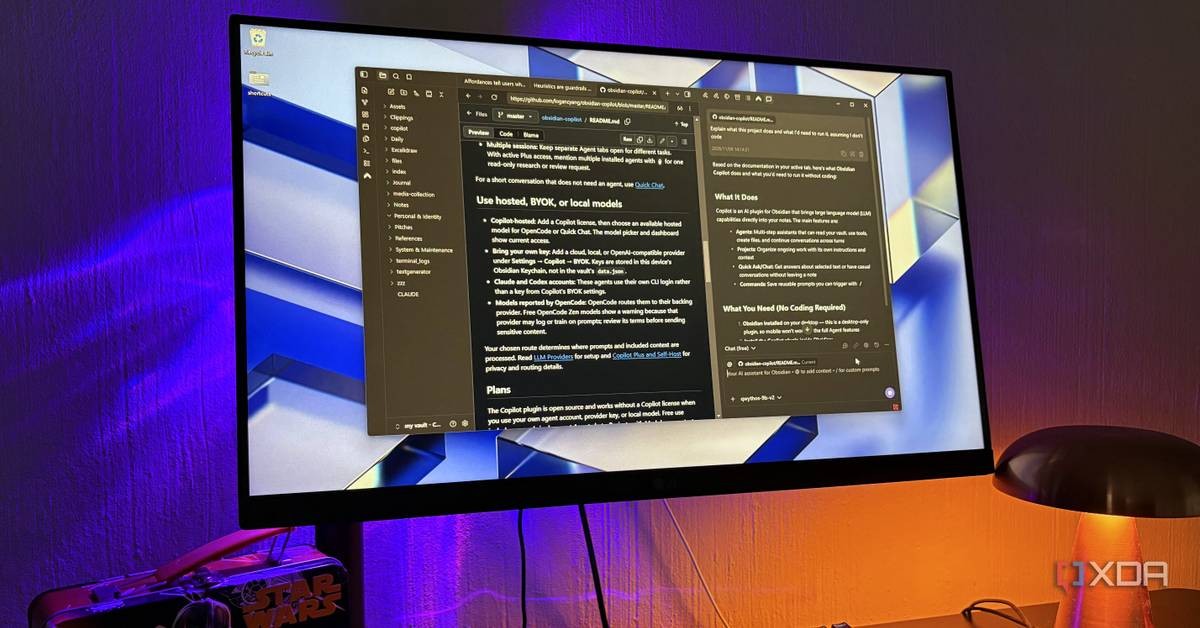
Obsidian, the note taking app, can now function as a local AI browser that replicates Gemini in Chrome's page aware assistant without sending research data to external servers, according to a workflow detailed by XDA-Developers on November 9, 2026. The setup combines Obsidian's built-in Web Viewer plugin with the community Copilot plugin, running a local model through LM Studio or Ollama.
The configuration matters for anyone who treats data sovereignty as a design requirement rather than a preference. Browser assistants like Google's send the page content to remote servers on every query, and with memory features enabled, they accumulate a running profile of a user's research. The Obsidian pipeline keeps that entire loop inside the vault.
How the Obsidian AI browser setup works
Obsidian has shipped a core plugin called Web Viewer since version 1.8 arrived in early 2025. Because Obsidian runs on Electron, which bundles Chromium, Web Viewer is effectively a Chromium webview loaded into a regular Obsidian tab. It can sit in a split beside an active note, run as a standalone window, or behave like a normal browser. Reader view strips pages to plain text using Mozilla's Readability library, the same code behind Firefox's reader mode, and a save option converts any page into a vault note. Ad blocking is enabled by default.
The AI layer comes from Copilot, a community plugin by developer Logan Yang with no relation to Microsoft's product of the same name. Copilot attaches whatever page is open in Web Viewer to a chat the same way it attaches a note. It is a BYOK setup: users select LM Studio or Ollama from the provider list, the local server address fills in automatically, and no API key is required for local operation. Cloud providers remain an option for users who prefer to paste in a key. The XDA-Developers author ran Qwythos 9B and Qwen 3.5 9B at 30k context on an 8GB GPU.
What a vault aware assistant does differently
The functional difference from Gemini in Chrome is context composition. In Copilot's free Chat mode, opened through Quick Chat, the active page attaches automatically and reattaches whenever a new page loads. Typing @ pulls in other notes, entire folders, or additional open web tabs, so a query can run against a page and the user's own writing simultaneously. The XDA-Developers author reports using it to check whether a UX article contradicts notes written months earlier, or to compare two pricing pages inside one chat. Selecting a paragraph attaches only that fragment, which helps with long documents like READMEs.
Copilot also supports saved slash prompts that can reference a specific note. A saved command can audit any open page against a personal criteria note, so a live site gets evaluated by the user's own standards. Chats autosave as Markdown files, which returns the output to the vault as a first class object rather than a disposable transcript.
This fits a broader pattern of vault centered AI workflows. A setup guide published by Nxcode describes the model as giving an assistant access to everything a user has written, including research, meeting notes, and code snippets, instead of starting each conversation from scratch. A separate plugin documented on Obsidian's site, Gemini Helper, adds vault wide reading, writing, and search. On GitHub, the obsidian-second-brain project extends the concept further, storing persistent memory for Claude Code, Codex, and six other AI agents as plain markdown inside a vault.
Current limits of the local pipeline
The setup is not a full replacement for Gemini's browser features. Copilot reads pages but cannot act on them, so there is no equivalent to Gemini's auto browse capability, the feature that clicks through sites on the user's behalf and sits behind Google's AI Pro and Ultra subscriptions. Context length is the other constraint. A 9B parameter local model holds a limited window, and the XDA-Developers author reports that Qwythos 9B often responded slowly on moderately long pages. Starting a new chat when the topic changes preserves the context budget.
The tradeoff is computational cost against data control. Local inference on consumer hardware is slower and less capable than frontier cloud models, but the entire pipeline, pages, notes, queries, and answers, stays on the machine. For research involving sensitive material, that is the deciding variable.
Why local first workflows are gaining ground
The XDA-Developers author notes that research tabs have drifted to Obsidian without that being the original plan. The stated reason is structural: a chat that lands as a note next to the material it analyzed closes the loop between browsing and archiving. The privacy property follows from the architecture rather than from a policy promise. Nothing leaves the vault as long as the AI layer stays local.
That architectural argument is the strongest one available. Data control enforced by network topology does not depend on a vendor's terms of service, a regulator's enforcement budget, or a model provider's memory settings. A user who runs the model locally has a guarantee that no configuration change on someone else's server can revoke.
FAQ
Does Obsidian have a built-in browser?
Yes. The Web Viewer core plugin, available since Obsidian 1.8 in early 2025, loads a Chromium webview into an Obsidian tab, with reader view, page saving, and default ad blocking.
Can a local LLM read web pages inside Obsidian?
Yes. The Copilot community plugin attaches the page open in Web Viewer to a chat and can run models locally through LM Studio or Ollama with no API key.
Can it browse or click through sites automatically like Gemini?
No. Copilot reads attached pages but cannot act on them, so Gemini's auto browse feature has no local equivalent in this setup.
Is the workflow fully private?
It is private as long as the model runs locally. Cloud API keys route prompts and page content to the chosen provider, which removes the local only property.